
Tili Ota yhteyttä
Ostoskorisi
Toimitus DPD & FedEx
Tarvitsetko apua? Kysy AI:lta

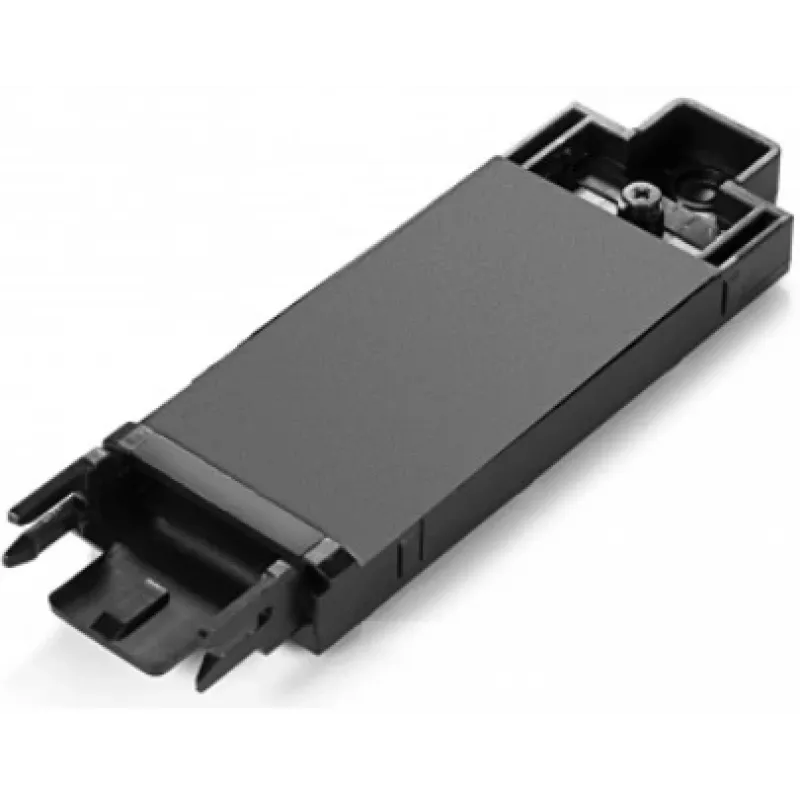
Lenovo 00UR868 SSD-asennuskehys

Lenovo 00UR868 SSD-asennuskehys
64,61 €
The ThinkPad P50 M.2 SATA SSD tray (Lenovo 00UR868) is a dedicated mounting bracket designed to install an M.2 SATA SSD into ThinkPad P50 workstations. The tray provides a secure mechanical interface for the drive and aligns the M.2 module with the laptop's internal connector to ensure correct fit a... Lue lisää
Varasto Loppu varastostaEi varastossa Tuotekoodi 2406255 Merkki LENOVO Malli FRU00UR868 Takuu 2 vuotta

Toimitus ja palautukset

The ThinkPad P50 M.2 SATA SSD tray (Lenovo 00UR868) is a dedicated mounting bracket designed to install an M.2 SATA SSD into ThinkPad P50 workstations. The tray provides a secure mechanical interface for the drive and aligns the M.2 module with the laptop's internal connector to ensure correct fit and reliable operation.

Advantages

The tray offers precise alignment and stable fixation for M.2 SATA SSDs in the ThinkPad P50 chassis, reducing the risk of poor connection or mechanical stress. Its form factor matches the original Lenovo mounting points, enabling straightforward replacement or upgrade without chassis modification.

Suitable for

  • Installing or replacing an M.2 SATA SSD in a Lenovo ThinkPad P50
  • Upgrading internal storage capacity of ThinkPad P50 workstations
  • Repair or maintenance tasks that require secure SSD mounting

Key specifications

  • Compatible drive type: M.2 SATA SSD (keying and size must match laptop requirements)
  • Target models: Lenovo ThinkPad P50 series
  • Material and finish: metal/plastic bracket designed for laptop internal mounting
  • Mounting: aligns M.2 module with onboard M.2 connector and secures with screw(s)

How to use

Power off the ThinkPad P50, disconnect any power sources and remove the service cover according to the laptop maintenance manual. Place the M.2 SATA SSD into the tray aligning the module with the connector and secure it with the appropriate screw(s). Reinstall the tray and service cover, then power on the system to verify the drive is detected and initialized in the operating system.

Recommendations

Use this tray only with compatible ThinkPad P50 systems and M.2 SATA SSD modules. Follow Lenovo service instructions for safe installation, handle the SSD and tray with anti-static precautions, and verify drive compatibility and BIOS settings after installation.
Tärkeimmät ominaisuudet
  • Installing or replacing an M.2 SATA SSD in a Lenovo ThinkPad P50
  • Upgrading internal storage capacity of ThinkPad P50 workstations
  • Repair or maintenance tasks that require secure SSD mounting
  • Compatible drive type: M.2 SATA SSD (keying and size must match laptop requirements)
  • Target models: Lenovo ThinkPad P50 series
  • Material and finish: metal/plastic bracket designed for laptop internal mounting
  • Mounting: aligns M.2 module with onboard M.2 connector and secures with screw(s)
Tekniset tiedot
Määrä pakkauksessa
1 pc(s)
Tuotteen väri
Black
Tyyppi
SSD tray
Yhteensopivat merkit
Lenovo
Yhteensopivuus
ThinkPad P50
Hintahistoria ei ole vielä saatavilla
Tästä tuotteesta ei ole vielä kertynyt riittävästi päivittäisiä hintatietoja.

Suositut tuotteet tässä kategoriassa

Hei, olen DistriNoden tekoälyavustaja. Autan sinua löytämään tuotteita, vertailemaan vaihtoehtoja, laatimaan tarjouksia PDF-muodossa tai tekemään tukipyyntöjä.