




Tili Ota yhteyttä
Ostoskorisi
Toimitus DPD & FedEx
Tarvitsetko apua? Kysy AI:lta

HP HPISPW valokuvatulostin ZINK (Zero Ink) 313 x 400 DPI 2" x 3" (5x7,6 cm)

HP HPISPW valokuvatulostin ZINK (Zero Ink) 313 x 400 DPI 2
HP HPISPW valokuvatulostin ZINK (Zero Ink) 313 x 400 DPI 2" x 3" (5x7,6 cm)
116,94 €
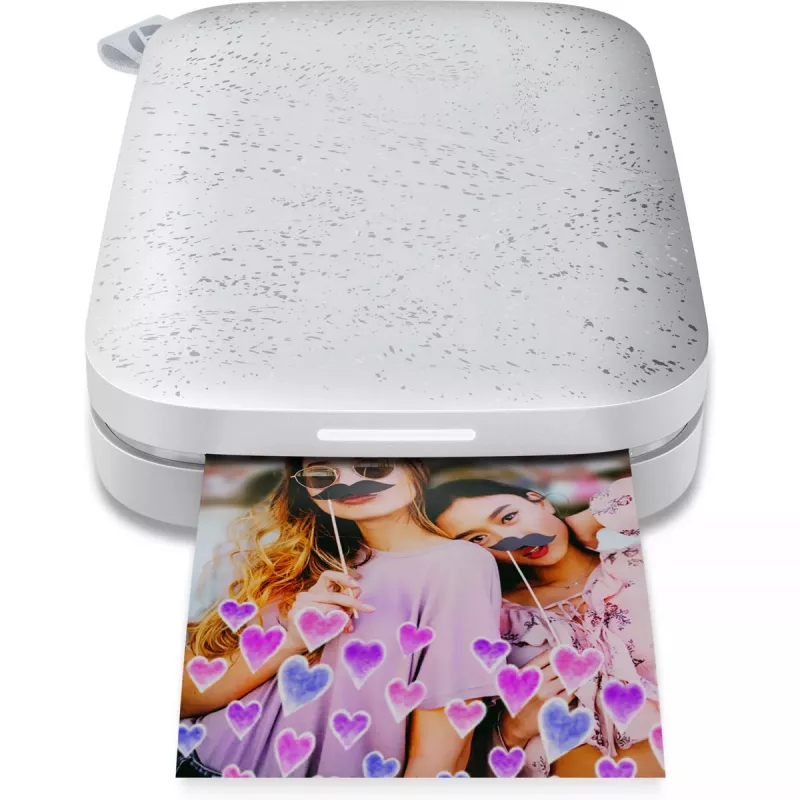
The HP Sprocket 200 ZINK Pearl is a compact Bluetooth photo printer that produces 5 x 7.6 cm (2 x 3 in) borderless prints using ZINK (Zero Ink) technology. With a maximum resolution of 313 x 400 DPI and a lightweight, pocketable design in pearl color, it lets you print photos directly from smartphon... Lue lisää
Varasto 5 Tuotekoodi 1448287 Merkki HP Malli HPISPW Takuu 2 vuotta

Toimitus ja palautukset

Arvioitu toimitusaika Maanantai, Lokakuu 19
Saat päivitykset yksityiskohtaisen seurantajärjestelmän kautta
Maksuvaihtoehdot
MaksukorttiVisaMastercardPayPalApple PayGoogle PayTilisiirto

The HP Sprocket 200 ZINK Pearl is a compact Bluetooth photo printer that produces 5 x 7.6 cm (2 x 3 in) borderless prints using ZINK (Zero Ink) technology. With a maximum resolution of 313 x 400 DPI and a lightweight, pocketable design in pearl color, it lets you print photos directly from smartphones and tablets for instant physical keepsakes.

Advantages

The Sprocket 200 requires no ink cartridges thanks to ZINK paper, offers wireless printing via Bluetooth for convenient mobile use, and delivers 2" x 3" photos with a maximum resolution of 313 x 400 DPI. Its small form factor and 0.172 kg weight make it easy to carry to events and gatherings.

Suitable for

  • Printing instant photos at parties and events
  • Creating physical photo keepsakes from smartphone images
  • On-the-go printing for travel and social meetups

Key specifications

  • Model: HP Sprocket 200 ZINK Pearl (MPN: 1AS85A#637)
  • Printing technology: ZINK (Zero Ink)
  • Maximum resolution: 313 x 400 DPI
  • Print size: 5 x 7.6 cm (2 x 3 in), borderless
  • Connectivity: Bluetooth
  • Product colour: Pearl
  • Weight: 0.172 kg
  • Ethernet LAN: No

How to use

Install the HP Sprocket app on your smartphone or tablet, enable Bluetooth on your device and pair it with the Sprocket 200. Load ZINK photo paper into the printer according to the included instructions, select a photo in the app, apply optional edits or templates, and tap print to produce a 2" x 3" photo. Follow on-screen prompts in the app for paper loading, firmware updates and print settings.

Recommendations

Use genuine ZINK photo paper compatible with the HP Sprocket 200, keep firmware and the HP Sprocket app updated, and store printed photos away from prolonged direct sunlight and high humidity for best longevity.
Tärkeimmät ominaisuudet
  • Printing instant photos at parties and events
  • Creating physical photo keepsakes from smartphone images
  • On-the-go printing for travel and social meetups
  • Model: HP Sprocket 200 ZINK Pearl (MPN: 1AS85A#637)
  • Printing technology: ZINK (Zero Ink)
  • Maximum resolution: 313 x 400 DPI
  • Print size: 5 x 7.6 cm (2 x 3 in), borderless
  • Connectivity: Bluetooth
  • Product colour: Pearl
  • Weight: 0.172 kg
  • Ethernet LAN: No
Tekniset tiedot
Akkutekniikka
Lithium Polymer (LiPo)
Akun kapasiteetti
550 mAh
Bluetooth
Yes
Ethernet LAN
No
HP Auto-On/Auto-Off
Yes
HP-segmentti
Home, Home office
Integroitu kortinlukija
No
Käytön suhteellinen ilmankosteus (H-H)
5 - 70
Käyttölämpötila (T-T)
5 - 40
Kerroksia lavalla
6 pc(s)
Korkeus
25 mm
Lavan bruttopaino
367.68 g
Lavan mitat (L x S x K)
1200 x 1000 x 1176
Leveys
80 mm
Markkina-asemointi
Home & Office
Muut tuetut käyttöjärjestelmät
Android, iOS
Paino
0.172 kg
Pakkauksen korkeus
33 mm
Pakkauksen leveys
165 mm
Pakkauksen paino
270 g
Pakkauksen syvyys
110 mm
Reunaton tulostus
Yes
Säilytyksen suhteellinen ilmankosteus (H-H)
5 - 90
Säilytyslämpötila (T-T)
-30 - 70
Sertifiointi
EN 301 489-1 V2.1.1:2017, EN 301 489-17 V3.1.1:2017, EN 55032:2015/+AC:2016 Class B, EN 55024:2010+A1:2015, EN 61000-3-2:2014, EN 61000-3-3:2013, CISPR 32:2015+COR1:2016 Class B, EN 50581:2012, ICES-003, Issue 6
Sisäinen muisti
64 MB
Suurin resoluutio
313 x 400
Suurin tulostuskoko
2" x 3" (5x7.6 cm)
Syöttökapasiteetti yhteensä
10 sheets
Syvyys
117.5 mm
Takuukortti
Yes
Tulostustekniikka
ZINK (Zero ink)
Tuotteen väri
Pearl
Tuotteita lavalla
1200 pc(s)
Ulkopakkauksia lavakerroksessa
240 pc(s)
Värin nimi
Luna Pearl
Virrankulutus (tulostus)
32 W
Virtalähde
Battery
Hintahistoria viimeisen 6 kuukauden ajalta
HP HPISPW valokuvatulostin ZINK (Zero Ink) 313 x 400 DPI 2" x 3" (5x7,6 cm)
Nykyinen
116,94 €
Alin
116,00 €
Ylin
133,65 €
Muutos 24 h
+0,94 €   +1%
Viikko
-0,67 €   -1%
Kuukausi
-0,34 €   0%

Teknologiamedioiden riippumattomat arvostelut

expertreviews.co.uk
8/10

Loppuarvio: For many, the Sprocket New Edition will be an expensive indulgence in the age of Instagram and Facebook, but for a few it could be a fun way to print and share memories, much in the spirit of the Polaroid camera. It could be a great gift to a backpacker, p...

Plussat
  • Convenient printing
  • Highly portable
  • Improved print speeds over original model
Miinukset
  • Only prints on special 2x3in ink-free paper
  • Dull-as-dishwater design
Lue koko arvostelu: expertreviews.co.uk →
trustedreviews.comThomas
7/10

Loppuarvio: The HP Sprocket 200 is a charming little party piece – but Zink paper is expensive. If you can find last year's virtually identical Sprocket for a reduced price, then it may offer better value...

Plussat
  • Tiny, pocketable, portable
  • No need for ink refills
  • Easy to connect to phones
Miinukset
  • Zink paper isn't cheap and is prone to curling
  • Bright areas look blown out
Lue koko arvostelu: trustedreviews.com →
goodhousekeeping.comThe
7.6/10

Loppuarvio: Compact and easy to use, this is a great Bluetooth instant printer. It's ideal if you'd often share it with your friends and family. At less than 50p per print, it's not as expensive as other instant printers to use, but it is a little slow to print. Ratin...

Plussat
  • It embeds the date the photo was taken, and a link to other pictures in your camera roll into the picture - you can see this when you use the app to scan the print after it's been created
  • You can add a great choice of borders, stickers and other edits to
Miinukset
  • You can't remove red eyes from images
Lue koko arvostelu: goodhousekeeping.com →

Suositut tuotteet tässä kategoriassa

Hei, olen DistriNoden tekoälyavustaja. Autan sinua löytämään tuotteita, vertailemaan vaihtoehtoja, laatimaan tarjouksia PDF-muodossa tai tekemään tukipyyntöjä.