
Tili Ota yhteyttä
Ostoskorisi
Toimitus DPD & FedEx
Tarvitsetko apua? Kysy AI:lta

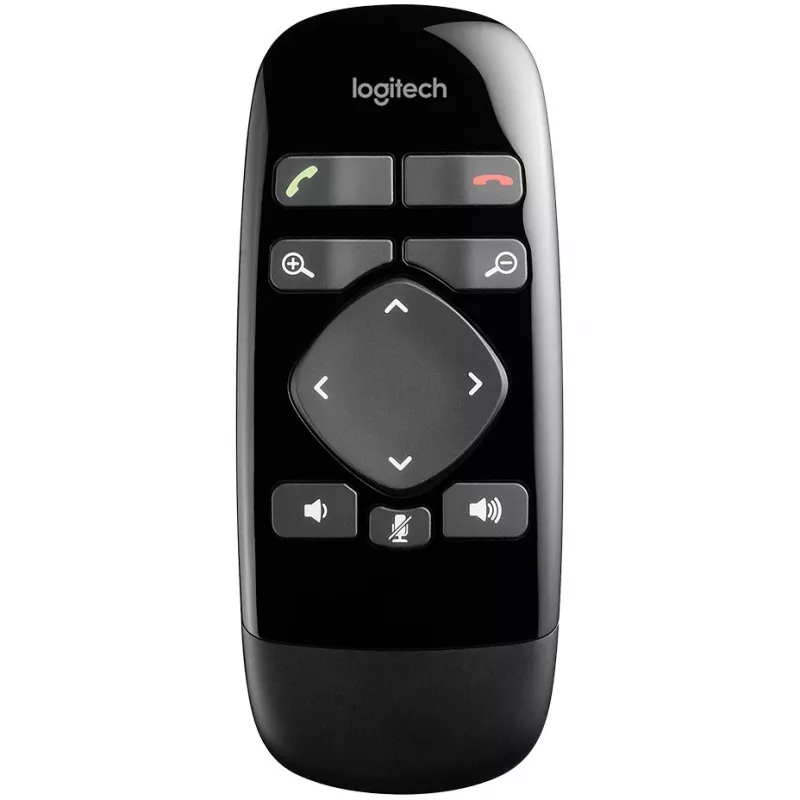
Kaukosäädin Logitech BCC950 IR langaton verkkokamera 11 painiketta

Kaukosäädin Logitech BCC950 IR langaton verkkokamera 11 painiketta
38,61 €
The Logitech BCC950 IR Wireless Remote Control is designed to operate the Logitech ConferenceCam and compatible webcams. It provides IR wireless connectivity with a maximum range of 3 meters and eleven press buttons to control camera functions and call handling. The remote is compact, black in color... Lue lisää
Varasto 15 Tuotekoodi 1176010 Merkki LOGITECH Malli 993-000754 Takuu 2 vuotta

Toimitus ja palautukset

Arvioitu toimitusaika Maanantai, Lokakuu 26
Saat päivitykset yksityiskohtaisen seurantajärjestelmän kautta
Maksuvaihtoehdot
MaksukorttiVisaMastercardPayPalApple PayGoogle PayTilisiirto

The Logitech BCC950 IR Wireless Remote Control is designed to operate the Logitech ConferenceCam and compatible webcams. It provides IR wireless connectivity with a maximum range of 3 meters and eleven press buttons to control camera functions and call handling. The remote is compact, black in color, and intended for single-device use with webcams.

Advantages

The remote offers simple, tactile control with 11 press buttons that let users pan, tilt and zoom the camera, answer and hang up calls, adjust volume and mute the microphone. IR wireless operation requires no pairing and provides straightforward compatibility with the BCC950 ConferenceCam. Its compact form factor and familiar button layout make it easy to use in meeting rooms and personal workspaces.

Suitable for

  • Controlling a Logitech BCC950 ConferenceCam from a short distance
  • Small meeting rooms and huddle spaces where a single webcam is used
  • Users who prefer physical button controls for camera and call functions

Key specifications

  • Connectivity: IR wireless
  • Buttons: 11 press buttons
  • Maximum operating range: 3 m
  • Number of supported devices: 1
  • Button backlight: no
  • Rechargeable: no (battery-powered)
  • Intended use: webcam remote control
  • Color: black

How to use

Point the remote toward the Logitech BCC950 ConferenceCam within the 3-meter range and press the appropriate buttons to pan, tilt or zoom the camera, answer or end calls, change volume and mute the microphone. No pairing procedure is required; replace batteries as needed to ensure reliable operation.

Recommendations

For reliable IR reception, keep a clear line of sight between the remote and the camera. Use the remote from within 3 meters and avoid bright direct sunlight or reflective surfaces that can interfere with the IR signal.
Tärkeimmät ominaisuudet
  • Controlling a Logitech BCC950 ConferenceCam from a short distance
  • Small meeting rooms and huddle spaces where a single webcam is used
  • Users who prefer physical button controls for camera and call functions
  • Connectivity: IR wireless
  • Buttons: 11 press buttons
  • Maximum operating range: 3 m
  • Number of supported devices: 1
  • Button backlight: no
  • Rechargeable: no (battery-powered)
  • Intended use: webcam remote control
  • Color: black
Tekniset tiedot
Akun tyyppi
CR2032
Harmonized System (HS) -koodi
85299097
Kaukosäätimen käyttötarkoitus
Webcam
Liitäntä
IR Wireless
Painikkeiden määrä
11
Suurin kantama
3 m
Taustavalaistut painikkeet
No
Tuettujen laitteiden määrä
1
Tulotyyppi
Press buttons
Tuotteen väri
Black
Uudelleenladattava
No
Yhteensopivat merkit
Logitech
Yhteensopivat tuotteet
BCC950
Hintahistoria viimeisen 6 kuukauden ajalta
Kaukosäädin Logitech BCC950 IR langaton verkkokamera 11 painiketta
Nykyinen
38,61 €
Alin
35,66 €
Ylin
41,89 €
Muutos 24 h
+0,57 €   +1%
Viikko
+2,51 €   +7%
Kuukausi
+2,66 €   +7%

Suositut tuotteet tässä kategoriassa

Myyjä: UAB KUR LT · Laisvės pr. 125A, LT-06118 Vilna, Liettua · Yritystunnus 303192950 · ALV-numero LT100008198612 · Toimitus EU:sta (Liettua)
Hei, olen DistriNoden tekoälyavustaja. Autan sinua löytämään tuotteita, vertailemaan vaihtoehtoja, laatimaan tarjouksia PDF-muodossa tai tekemään tukipyyntöjä.