
Tili Ota yhteyttä
Ostoskorisi
Toimitus DPD & FedEx
Tarvitsetko apua? Kysy AI:lta

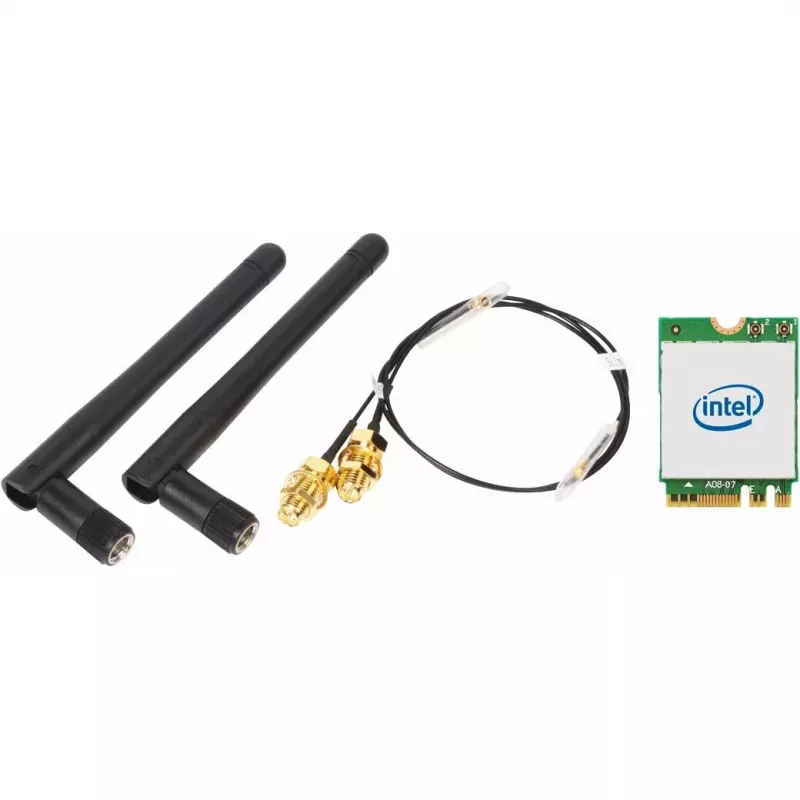
Langaton WLAN/Bluetooth-sarja SHUTTLE WLN-M12 Intel AX210 M.2 -kortilla, triband-Wi‑Fi 6E (2,4/5/6 GHz), 2x2, 2400 Mbit/s, ulkoiset antennit

Langaton WLAN/Bluetooth-sarja SHUTTLE WLN-M12 Intel AX210 M.2 -kortilla, triband-Wi‑Fi 6E (2,4/5/6 GHz), 2x2, 2400 Mbit/s, ulkoiset antennit
51,65 €
PDF
PDF
Varasto 16 Tuotekoodi 1732419 Malli WLN-M12 Takuu 2 vuotta

Toimitus ja palautukset

Arvioitu toimitusaika torstai 12. marraskuuta
Saat päivitykset yksityiskohtaisen seurantajärjestelmän kautta
Maksuvaihtoehdot
MaksukorttiVisaMastercardPayPalApple PayGoogle PayTilisiirto

Esitä kysymys – AI-avustaja vastaa heti.

Kuvaus

SHUTTLE WLN-M12 is a WLAN and Bluetooth combo kit designed for slim desktop systems. The kit includes an Intel AX210 M.2-2230 wireless card, antenna cables and two external antennas to provide tri-band Wi‑Fi 6E connectivity (2.4 / 5 / 6 GHz) with a 2x2 antenna configuration and maximum theoretical throughput up to 2400 Mbit/s. Bluetooth 5.2 support is included for wireless peripherals and audio.

Advantages

The kit integrates an Intel WLAN‑AX210 M.2 card and accessories needed to add wireless networking to compatible slim PCs, offering Wi‑Fi 6E performance and modern Bluetooth support in a compact internal module. Its external antennas and dedicated cables improve signal reception compared with small onboard antennas, while the M.2 interface provides a straightforward installation path into systems that accept M.2 2230 wireless cards.

Suitable for

When it may not be suitable

The WLN-M12 requires a compatible M.2 slot and appropriate driver support from the host system; it is not a USB or PCIe adapter. Systems without an M.2 2230 wireless slot or where the manufacturer blocks non‑certified modules will not be able to use this kit. Performance depends on router capabilities, environmental factors, and driver configuration, so peak throughput is achievable only with matching network infrastructure and favorable conditions.

Key specifications

How to use

Power down the PC and open the chassis according to the system manufacturer’s instructions. Insert the M.2 wireless card into an available M.2 2230 slot and secure it with the appropriate screw. Route and connect the supplied antenna cables to the card’s antenna connectors, then mount the external antennas in the desired positions for optimum reception. Close the chassis, power on the system, and install any required drivers provided by the system manufacturer or Intel. Configure wireless network settings through the operating system’s network manager once drivers are installed.

What to consider before purchase

Recommendations

For best wireless performance, pair the WLN-M12 with a Wi‑Fi 6E capable router and place the external antennas with clear line of sight to the router where possible. Keep system firmware and wireless drivers up to date and verify that the 6 GHz band is permitted and supported in your region before relying on that band for connectivity.

Tärkeimmät ominaisuudet
  • Upgrading a slim PC or barebone system to Wi‑Fi 6E and Bluetooth 5.2
  • Users who need tri‑band wireless (2.4 / 5 / 6 GHz) for reduced congestion and improved performance
  • Setups that benefit from external antennas to achieve better wireless range and stability
  • Systems with an available M.2 slot compatible with M.2‑2230 wireless cards
  • Wireless standard: Wi‑Fi 6E (802.11ax), backward compatible with earlier 802.11 standards
  • Frequency bands: Tri‑band — 2.4 GHz, 5 GHz, 6 GHz
  • Maximum theoretical data rate: up to 2400 Mbit/s
  • Antenna configuration: 2x2 antenna ports with external antennas included
  • Bluetooth version: Bluetooth 5.2
  • Form factor / host interface: M.2 (M.2‑2230 wireless card)
  • Confirm your system has a compatible M.2 2230 slot and allows user‑installed wireless modules
  • Check operating system driver support for the Intel AX210 card in your OS version
  • Ensure your router or access point supports Wi‑Fi 6E (6 GHz) if you require 6 GHz band operation
  • Plan antenna placement to achieve the best signal for your environment

Tekniset tiedot

Tekniset tiedot
Antenni
Yes
Antennin suuntaavuus
Omni-directional
Antenniratkaisu
External
Antennityyppi
2x2
Bluetooth
Yes
Bluetooth-versio
5.2
Harmonized System (HS) -koodi
85177900
Isäntäliitäntä
M.2
Käyttökohde
PC
Käyttölämpötila (T-T)
0 - 80 °C
Korkeus
2.4 mm
Leveys
30 mm
Liitäntä
WLAN / Bluetooth
Liitäntätekniikka
Wireless
Nopein Wi-Fi-standardi
Wi-Fi 6E (802.11ax)
Pika-asennusopas
Yes
Sisäinen
Yes
Suurin tiedonsiirtonopeus
2400 Mbit/s
Syvyys
22 mm
Tuetut Linux-käyttöjärjestelmät
Yes
Tuetut Windows-käyttöjärjestelmät
Windows 10, Windows 11
Verkkostandardit
IEEE 802.11b, IEEE 802.11g, IEEE 802.11n, IEEE 802.11ax, IEEE 802.11ac
Wi-Fi
Yes
Wi-Fi-standardit
802.11b, 802.11g, Wi-Fi 4 (802.11n), Wi-Fi 5 (802.11ac), Wi-Fi 6E (802.11ax)
Wi-Fi-taajuuskaista
Tri-band (2.4 GHz / 5 GHz / 6 GHz)
Hintahistoria viimeisen 6 kuukauden ajalta
Langaton WLAN/Bluetooth-sarja SHUTTLE WLN-M12 Intel AX210 M.2 -kortilla, triband-Wi‑Fi 6E (2,4/5/6 GHz), 2x2, 2400 Mbit/s, ulkoiset antennit
Nykyinen
51,65 €
Alin
50,72 €
Ylin
54,17 €
Muutos 24 h
0,00 €   0%
Viikko
0,00 €   0%
Kuukausi
+0,18 €   +0%

Kirjoita arvostelu

Arvosana *
Nimesi näytetään julkisesti – voit käyttää nimimerkkiä. Kutsumme ostajia kirjoittamaan arvosteluja; tarkistamme arvostelut ennen julkaisua ja julkaisemme myös kriittiset.

Suositut tuotteet tässä kategoriassa

8
Myyjä: UAB KUR LT · Laisvės pr. 125A, LT-06118 Vilna, Liettua · Yritystunnus 303192950 · ALV-numero LT100008198612 · Toimitus EU:sta (Liettua)
WhatsApp
Messenger
Hei, olen DistriNoden tekoälyavustaja. Autan sinua löytämään tuotteita, vertailemaan vaihtoehtoja, laatimaan tarjouksia PDF-muodossa tai tekemään tukipyyntöjä.
Kaikki kategoriat