
Tili Ota yhteyttä
Ostoskorisi
Toimitus DPD & FedEx
Tarvitsetko apua? Kysy AI:lta

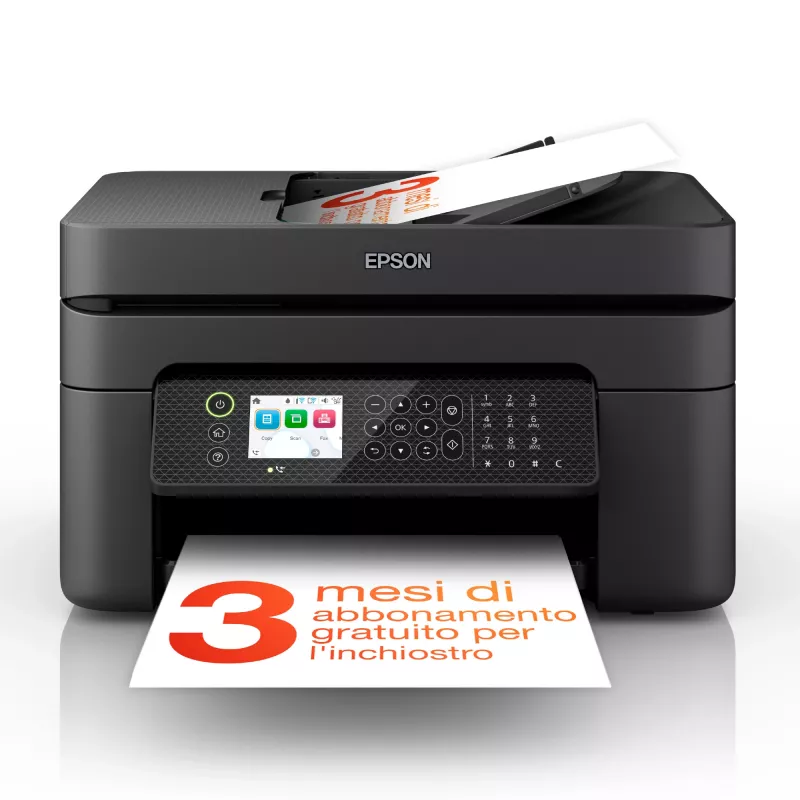
Epson WorkForce WF-2950DWF mustesuihku A4 5760 x 1440 DPI 33 ppm Wi-Fi

Epson WorkForce WF-2950DWF mustesuihku A4 5760 x 1440 DPI 33 ppm Wi-Fi
118,20 €
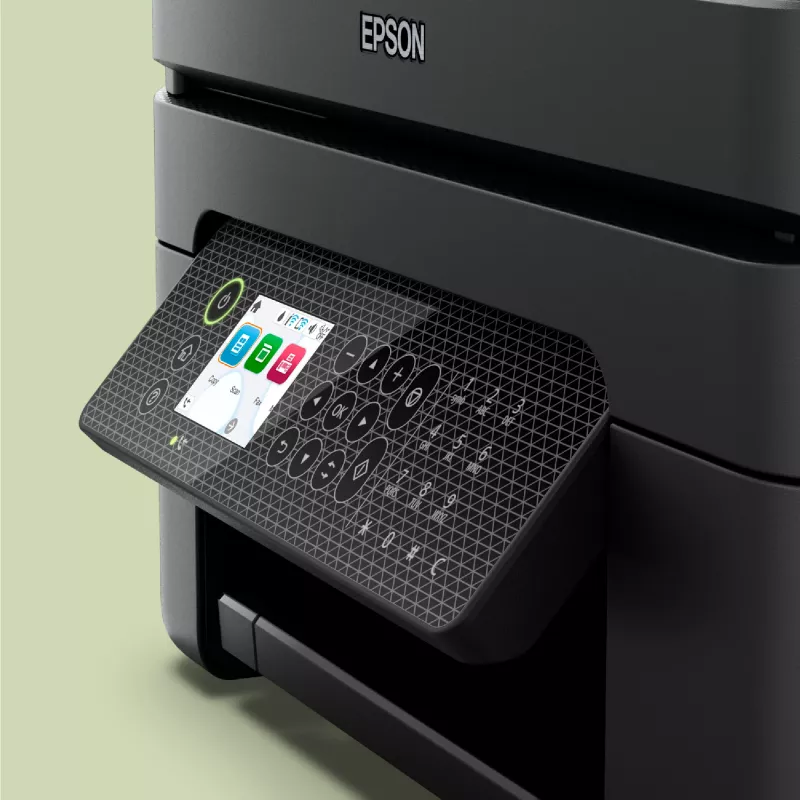
The Epson WorkForce WF-2950DWF Inkjet Colour Printing multifunction printer combines colour printing, scanning, copying and faxing in a compact black chassis designed for home and small office environments. It delivers high-resolution output up to 5760 x 1440 DPI for photos and documents, supports a... Lue lisää
Varasto 62 Tuotekoodi 1431048 Merkki EPSON Malli C11CK62402 Takuu 2 vuotta

Toimitus ja palautukset

Arvioitu toimitusaika Torstai, Lokakuu 22
Saat päivitykset yksityiskohtaisen seurantajärjestelmän kautta
Maksuvaihtoehdot
MaksukorttiVisaMastercardPayPalApple PayGoogle PayTilisiirto

The Epson WorkForce WF-2950DWF Inkjet Colour Printing multifunction printer combines colour printing, scanning, copying and faxing in a compact black chassis designed for home and small office environments. It delivers high-resolution output up to 5760 x 1440 DPI for photos and documents, supports automatic duplex printing to save paper, and offers wireless connectivity for convenient mobile and networked printing. The device balances print quality and everyday performance with a maximum duty cycle suitable for moderate monthly workloads.

Advantages

The printer produces high-detail colour prints and photos thanks to a maximum resolution of 5760 x 1440 DPI, while colour scanning at an optical resolution of 1200 x 2400 DPI captures fine detail for digitising documents. Automatic duplex printing reduces paper use and supports two-sided document workflows. Integrated Wi‑Fi enables printing from smartphones and tablets without cables, and the multifunction design combines scanning, copying and faxing into a single unit to save space. The unit’s lightweight construction aids installation and repositioning within a workspace.

Suitable for

  • Home offices and small businesses requiring colour prints, scans and copies
  • Users who need duplex printing for two-sided documents
  • Mobile printing from smartphones and tablets via Wi‑Fi
  • Occasional faxing alongside everyday printing tasks

Key specifications

  • Print technology: Inkjet colour printing
  • Maximum print resolution: 5760 x 1440 DPI
  • Print speed: up to 18 pages per minute (colour, normal quality) and up to 33 pages per minute (black, normal quality, A4/US Letter)
  • Scanning: colour scanning with optical resolution up to 1200 x 2400 DPI
  • Copying: colour copying capability
  • Duplex: automatic double‑sided printing
  • Connectivity: Wi‑Fi enabled for wireless printing (no Ethernet LAN)
  • Maximum paper size: A4
  • Maximum duty cycle: up to 3000 pages per month
  • Weight: approximately 5.3 kg
  • Product colour: black

How to use

Place the printer on a stable, level surface near a power outlet and within Wi‑Fi range of your router or mobile device. Install the ink cartridges and load A4 paper into the input tray according to the user guide. Connect the printer to your wireless network using the control panel setup or the included software, then install the drivers on your computer or mobile device. Use the scan and copy functions from the control panel or the scanning software; send and receive faxes using the dedicated fax settings. For double‑sided printing, select duplex print in the printer settings before sending a print job.

Recommendations

For consistent print quality and reliable operation, use manufacturer‑recommended ink cartridges and paper types within the supported weight range. Perform regular cleaning cycles and occasional alignment from the printer maintenance menu to maintain scanning and printing accuracy. Limit monthly usage to levels aligned with the device’s maximum duty cycle to prolong component life.

Tärkeimmät ominaisuudet
  • Home offices and small businesses requiring colour prints, scans and copies
  • Users who need duplex printing for two-sided documents
  • Mobile printing from smartphones and tablets via Wi‑Fi
  • Occasional faxing alongside everyday printing tasks
  • Print technology: Inkjet colour printing
  • Maximum print resolution: 5760 x 1440 DPI
  • Print speed: up to 18 pages per minute (colour, normal quality) and up to 33 pages per minute (black, normal quality, A4/US Letter)
  • Scanning: colour scanning with optical resolution up to 1200 x 2400 DPI
  • Copying: colour copying capability
  • Duplex: automatic double‑sided printing
  • Connectivity: Wi‑Fi enabled for wireless printing (no Ethernet LAN)
  • Maximum paper size: A4
  • Maximum duty cycle: up to 3000 pages per month
  • Weight: approximately 5.3 kg
  • Product colour: black
Tekniset tiedot
AC-tulojännite
100 - 240 V
AC-tulotaajuus
50 - 60 Hz
Asiakirjansyöttölaitteen (ADF) kapasiteetti
30 sheets
Automaattinen asiakirjansyöttölaite (ADF)
No
Ethernet LAN
No
Faksaus
Colour faxing
Faksimuisti
100 pages
Faksin siirtonopeus
3 sec/page
ISO A -sarjan koot (A0...A9)
A4, A5, A6
ISO B -sarjan koot (B0...B9)
B5, B6
Kaksipuolinen tulostus
Yes
Kaksipuolisen tulostuksen tila
Auto
Kaksipuolisuustoiminnot
Print
Kirjekuorikoot
10, C6, DL
Kopiointi
Colour copying
Korkeus
218 mm
Leveys
375 mm
Markkina-asemointi
Business
Mobiilitulostustekniikat
Apple AirPrint, Epson Connect, Epson Email Print, Epson Remote Print, Epson Scan to Cloud, Epson iPrint, Mopria Print Service
Modeemin nopeus
33.6 Kbit/s
Optinen skannaustarkkuus
1200 x 2400 DPI
Paino
5.3 kg
Paperilokeron materiaalin paino
64 - 300 g/m²
Paperilokeron tulostusmateriaalit
Envelopes, Photo paper, Plain paper
Pikavalinta
Yes
Reunaton tulostus
Yes
Sisäänrakennettu näyttö
Yes
Skannaus
Colour scanning
Skannaustekniikka
CIS
Skannerin tyyppi
ADF scanner
Suurin ISO A -sarjan paperikoko
A4
Suurin kuukausittainen tulostusmäärä
3000 pages per month
Suurin resoluutio
5760 x 1440 DPI
Syöttökapasiteetti yhteensä
100 sheets
Syöttölokeroiden kokonaismäärä
1
Syvyys
300 mm
Tuetut Mac-käyttöjärjestelmät
Mac OS X 10.10 Yosemite, Mac OS X 10.11 El Capitan, Mac OS X 10.12 Sierra, Mac OS X 10.13 High Sierra, Mac OS X 10.14 Mojave, Mac OS X 10.15 Catalina, Mac OS X 10.15.3 Catalina, Mac OS X 10.2 Jaguar, Mac OS X 10.3 Panther, Mac OS X 10.4 Tiger, Mac OS X 10.5 Leopard, Mac OS X 10.6 Snow Leopard, Mac OS X 10.7 Lion, Mac OS X 10.8 Mountain Lion, Mac OS X 10.9 Mavericks, Mac OS X 11.0 Big Sur, Mac OS X 12.0 Monterey
Tuetut palvelinkäyttöjärjestelmät
Windows Server 2003, Windows Server 2008 R2, Windows Server 2012 R2, Windows Server 2012 x64, Windows Server 2016
Tuetut Windows-käyttöjärjestelmät
Windows 10, Windows 11, Windows 7, Windows 8, Windows Vista, Windows XP
Tulostus
Colour printing
Tulostusnopeus (musta, normaali laatu, A4/US Letter)
33 ppm
Tulostusnopeus (väri, normaali laatu, A4/US Letter)
18 ppm
Tulostustekniikka
Inkjet
Tulostusvärit
Black, Cyan, Magenta, Yellow
Tuotteen väri
Black
Turva-algoritmit
64-bit WEP, 128-bit WEP, WPA-PSK, WPA-TKIP, WPA2-AES, WPA2-PSK, WPA3-SAE
USB 2.0 -liitäntöjen määrä
1
USB-liitäntä
Yes
Valokuvapaperin koot
10x15,13x18 cm
Värikasettien määrä
4
Värinäyttö
Yes
Virrankulutus (käyttövalmis)
4.6 W
Virrankulutus (kopiointi)
12 W
Virrankulutus (lepotila)
0.7 W
Virrankulutus (pois päältä)
0.2 W
Wi-Fi
Yes
Wi-Fi-standardit
802.11b, 802.11g, Wi-Fi 4 (802.11n)

Käyttöohje

Avaa asiakirja
Hintahistoria viimeisen 6 kuukauden ajalta
Epson WorkForce WF-2950DWF mustesuihku A4 5760 x 1440 DPI 33 ppm Wi-Fi
Nykyinen
118,20 €
Alin
117,26 €
Ylin
119,09 €
Muutos 24 h
+0,74 €   +1%
Viikko
+0,11 €   +0%
Kuukausi
-0,56 €   0%

Teknologiamedioiden riippumattomat arvostelut

rtings.comOlivier
6/10

“The Epson WorkForce WF-2950 is an all-in-one inkjet printer intended for small offices. It replaces the Epson WorkForce WF-2850 but remains very similar in design, with only minor changes beneath the skin.”

Plussat
  • Has flatbed scanner and ADF
  • Decent range of connection options
  • Good printed document quality
Miinukset
  • Slow printing speed
  • Low page yields
  • Somewhat cheap build quality
Lue koko arvostelu: rtings.com →

Suositut tuotteet tässä kategoriassa

Myyjä: UAB KUR LT · Laisvės pr. 125A, LT-06118 Vilna, Liettua · Yritystunnus 303192950 · ALV-numero LT100008198612 · Toimitus EU:sta (Liettua)
Hei, olen DistriNoden tekoälyavustaja. Autan sinua löytämään tuotteita, vertailemaan vaihtoehtoja, laatimaan tarjouksia PDF-muodossa tai tekemään tukipyyntöjä.